

Description
Q: Create 1 pair of buy orders
For example I bought the ES at 1000, selling it at 1001, but buying it back with an OCO at 1002 or 997. This seems weird, but sometimes little successes make one smile
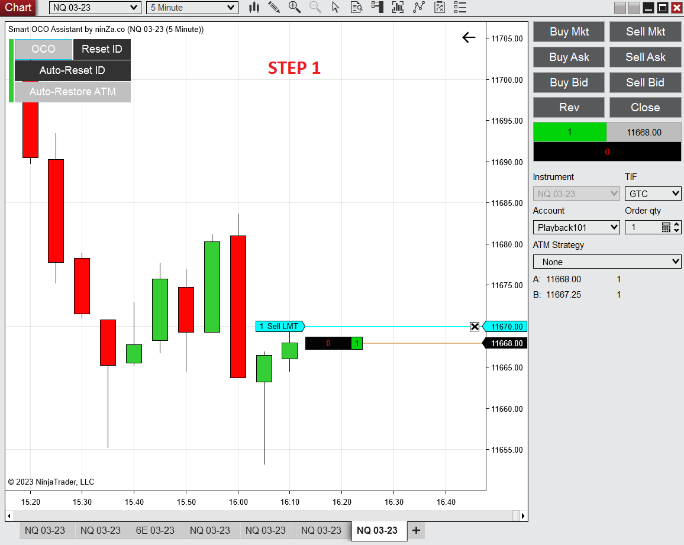
A: After you place an order like in picture 1 (step 1). You could use Smart OCO Assistant and turn on the OCO feature (the OCO button).
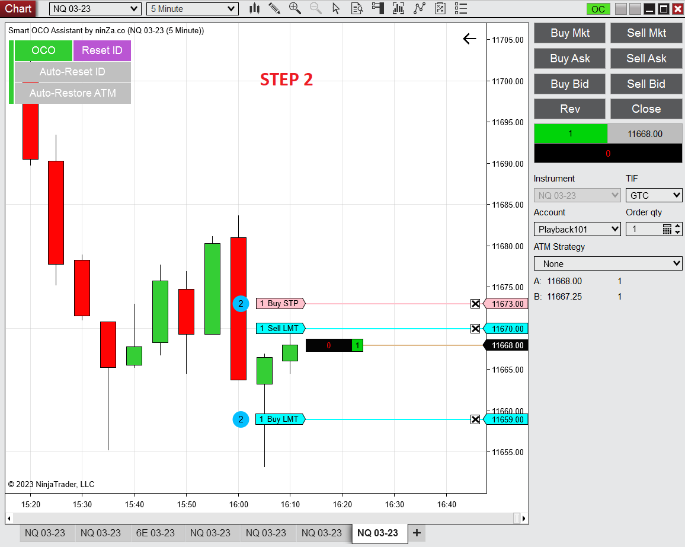
Then, continue to place 2 orders, which means 1 BUY STOP MARKET order + 1 BUY LIMIT order as shown in picture 2 (step 2).
At this time, these 2 orders will have the same OCO ID. If 1 of these 2 orders is filled, the other order will be canceled.





Reviews
There are no reviews yet.